

1. Using Weak or Default Admin Passwords 2. Not Updating WordPress, Themes, or Plugins Mistake: Running outdated WordPress versions, themes, or plugins can expose your site to vulnerabilities.Solution: 3. Installing Plugins or Themes from Untrusted Sources Mistake: Using nulled or pirated themes/plugins increases the risk of malware or backdoors.Solution: 4. Ignoring Two-Factor Authentication (2FA) 5. Not Limiting Login Attempts 6. Skipping Regular Backups 7. Using the Default “admin” Username Mistake: Many attackers target the default “admin” username for brute-force attempts.Solution: 8. Not Securing wp-config.php Mistake: Leaving the wp-config.php file exposed increases the risk of sensitive data leakage.Solution: 9. Failing to Use HTTPS 10. Not Monitoring for Malware 11. Using Shared Hosting Without Security Measures 12. Not Changing the WordPress Login URL 13. Weak Database Prefix 14. Not Setting Proper File Permissions Mistake: Incorrect file permissions can give attackers access to sensitive files.Solution: 15. Disabling Security Plugins Mistake: Ignoring the importance of a dedicated security solution.Solution: Regularly review your website’s security setup and stay informed about the latest threats. By being proactive, you can significantly reduce the risk of cyberattacks on your WordPress site.
Mastering Speed: The Ultimate Guide to WordPress Performance Optimization
In today’s fast-paced digital world, speed isn’t just a luxury—it’s a necessity. A slow WordPress site can frustrate your visitors, hurt your search engine rankings, and ultimately cost you conversions. But fear not! With the right strategies, you can transform your WordPress website into a lightning-fast platform that delights users and keeps them coming back for more. Here’s your ultimate guide to mastering WordPress performance optimization, with actionable tips that will make your site faster than ever. 1. Leverage Caching to Reduce Load Times Caching is one of the most effective ways to improve WordPress performance. By storing a static version of your website’s content, caching reduces the need for server processing, resulting in faster load times. Actionable Steps: 2. Optimize Your Images Without Losing Quality Images are often the biggest contributors to slow loading times. Optimizing them can dramatically speed up your site while maintaining visual appeal. Actionable Steps: 3. Implement Lazy Loading for Faster Initial Load Times Lazy loading ensures that images and videos are loaded only when they’re about to appear in the user’s viewport. This reduces the initial load time and improves user experience. Actionable Steps: 4. Choose High-Performance Hosting Your hosting provider is the foundation of your site’s speed. A reliable, high-performance host ensures that your site loads quickly, even during traffic spikes. Actionable Steps: 5. Minify and Combine CSS, JavaScript, and HTML Minification removes unnecessary characters like spaces and comments from your site’s code, while combining files reduces the number of requests made to the server. Actionable Steps: 6. Use a Content Delivery Network (CDN) A CDN stores copies of your website’s content on servers worldwide, ensuring faster delivery to users regardless of their location. Actionable Steps: 7. Keep Your WordPress Site Updated Outdated software can slow down your site and expose it to security vulnerabilities. Regular updates ensure optimal performance and compatibility. Actionable Steps: 8. Reduce HTTP Requests Each element on your website—images, scripts, stylesheets—creates an HTTP request. Reducing these requests can significantly boost your site’s speed. Actionable Steps: 9. Limit External Scripts and Fonts External resources like third-party scripts and fonts can slow down your site. Actionable Steps: 10. Monitor Performance Regularly Even with optimization in place, regular monitoring ensures your site remains fast and efficient. Actionable Steps:
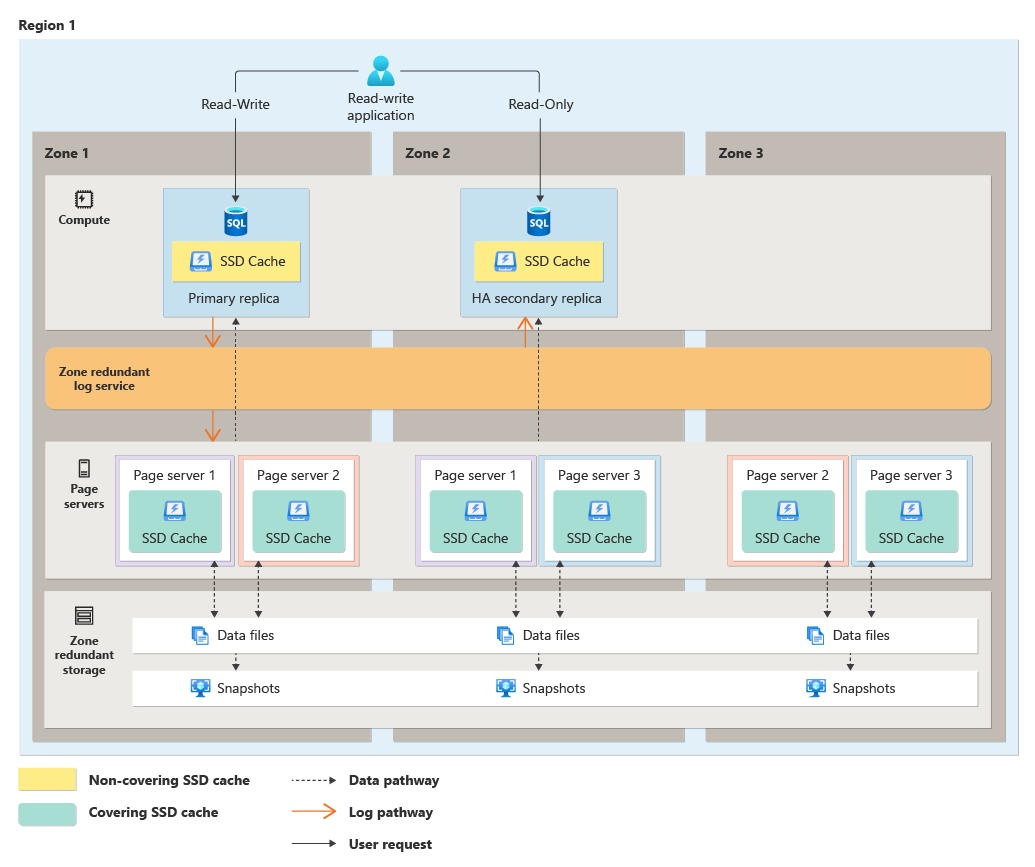
Automating Database Backups and Restores with WP-CLI
Managing a WordPress website often involves working with its database. Backups and restores are critical to maintaining the health and security of your site. While tools like phpMyAdmin or plugins like UpdraftPlus can handle these tasks, they often involve manual steps or additional overhead. Enter WP-CLI—the command-line interface for WordPress—which provides a powerful, efficient, and automated way to handle database backups and restores. This guide dives deep into using WP-CLI for automating database backups and restores, complete with practical examples. Why Automate Database Backups and Restores? Automation saves time and reduces human error. Here are key benefits: Getting Started with WP-CLI Before proceeding, ensure WP-CLI is installed and configured on your server. You can check this by running: If WP-CLI is installed, this command will display the version and environment details. If not, follow the official WP-CLI installation guide to set it up. Backing Up the Database with WP-CLI WP-CLI’s wp db export command is your go-to tool for exporting the WordPress database. Here’s how you can use it. Basic Database Backup Run the following command in your WordPress installation directory: This command creates a file named backup.sql in the current directory containing your database content. Customizing the Backup You can customize the output filename and directory: Excluding Tables To exclude specific tables: wp db export backup.sql –exclude_tables=wp_comments,wp_commentmeta Automating Backups with Cron Jobs You can automate database backups by scheduling the WP-CLI command using cron jobs. Setting Up a Cron Job This ensures your database is backed up daily, automatically. Restoring the Database with WP-CLI Restoring a database backup is just as straightforward with WP-CLI. Use the wp db import command. Basic Restore To restore from a backup file: Ensure the backup file is in the current directory or specify the full path to the file. Clearing Existing Data Before importing, you may want to clear the existing database to prevent conflicts: The –yes flag confirms the action without prompting, making it suitable for automation. Automating Restores Restores can also be automated, for example, as part of a staging site setup: Make the script executable: chmod +x restore.sh Execute the script whenever needed: ./restore.sh Practical Example: Full Backup and Restore Workflow Here’s a complete example combining backup and restore operations for a WordPress staging site: Automated Restore Script Create a script named restore.sh: !/bin/bash BACKUP_DIR=”/path/to/backups”FILENAME=”backup-$(date +%F-%H-%M).sql”wp db export $BACKUP_DIR/$FILENAME Automated Restore Script Create a script named restore.sh: Best Practices for WP-CLI Automation
WordPress And Quantum Computing The Next Frontier
While quantum computing is still in its nascent stages, its potential to revolutionize web development and WordPress cannot be ignored. This article delves into what quantum computing is, its potential applications in the WordPress ecosystem, and the challenges and opportunities it presents. Understanding Quantum Computing At its core, quantum computing leverages the principles of quantum mechanics to process information. Unlike classical computers, which use bits as the smallest unit of data (representing 0 or 1), quantum computers use qubits that can exist in multiple states simultaneously, thanks to a phenomenon called superposition. Additionally, quantum entanglement allows qubits to be interconnected in ways that amplify computational power exponentially. In essence, quantum computers are designed to solve problems that are currently intractable for classical systems, such as optimizing complex systems, simulating molecular structures, and cracking cryptographic codes. Quantum Computing’s Impact on Web Technologies Before diving into WordPress-specific implications, let’s consider the broader impact of quantum computing on web technologies: These advancements lay the groundwork for transforming WordPress and its ecosystem. Applications of Quantum Computing in WordPress While quantum computing is still not accessible to everyday developers, its eventual integration into WordPress could unlock new possibilities: 1. Quantum-Enhanced Security WordPress, being an open-source platform, is a prime target for cyberattacks. Quantum computing can: 2. Optimized Search and Performance Search functionality is critical for WordPress websites, especially for e-commerce and large content sites. Quantum algorithms could: 3. Personalized User Experiences Quantum computing can enhance AI-driven personalization features in WordPress, such as: 4. Revolutionizing SEO Quantum computing could transform search engine optimization (SEO) for WordPress by: 5. Redefining Plugin and Theme Development Quantum-powered tools could: Challenges in Adopting Quantum Computing for WordPress While the possibilities are exciting, there are significant challenges to consider: 1. Accessibility Quantum computers are currently limited to research institutions and large corporations due to their high costs and technical complexity. It may take years before they become accessible to the WordPress community. 2. Learning Curve Integrating quantum computing into WordPress will require developers to acquire new skills. Quantum programming languages like Qiskit and Cirq are vastly different from traditional web development languages. 3. Compatibility WordPress’s reliance on PHP and MySQL might face compatibility hurdles when integrating quantum-powered features. A hybrid approach will likely be necessary. 4. Ethical Concerns The immense computational power of quantum systems raises ethical questions, such as: Preparing WordPress for the Quantum Era While widespread adoption of quantum computing may be years away, the WordPress community can take proactive steps to prepare: The Future of WordPress and Quantum Computing The intersection of quantum computing and WordPress represents an exciting frontier in web development. While the technology is still in its infancy, its potential to revolutionize areas like security, personalization, and performance is undeniable. By embracing this paradigm shift, the WordPress community can ensure that the platform remains innovative, secure, and capable of meeting the challenges of tomorrow. As quantum computing evolves, so too will its impact on WordPress. The question is not if, but when, this transformative technology will reshape the way we build and manage websites.

Ethical Considerations in WordPress AI Development
Integration with WordPress has opened new possibilities for developers, businesses, and content creators. From AI-driven chatbots and personalized content recommendations to advanced analytics and automation, WordPress AI tools enhance website functionality, usability, and engagement. However, these advancements bring with them a host of ethical challenges. Understanding and addressing these issues is essential for ensuring responsible and equitable use of AI in the WordPress ecosystem. WordPress Data Privacy and Security AI relies heavily on data to function effectively. In WordPress, plugins and tools that use AI often require access to user data such as browsing habits, personal information, or even behavioral analytics. This dependency raises critical questions about privacy: Algorithmic Bias AI systems are only as good as the data they are trained on, and WordPress-based AI is no exception. If an AI plugin or tool is trained on biased data, it can produce biased results, leading to: To address these issues, developers should: Transparency and Explainability AI can often feel like a “black box” to end-users, with little clarity about how decisions are made. For WordPress AI tools to gain user trust, transparency is key: Ethical Use of Automation Automation through AI in WordPress can streamline processes, but it also comes with ethical risks: Mitigation strategies include setting clear guidelines for AI-generated content and balancing automation with human oversight. Accessibility and Inclusivity One of WordPress’s greatest strengths is its emphasis on inclusivity, enabling individuals and organizations worldwide to create and manage websites. However, integrating AI should not compromise this principle: Accountability and Governance When AI tools fail, who is responsible? This is a critical question for WordPress developers and site owners: Environmental Impact AI systems require significant computational resources, which can have a considerable environmental footprint:
