
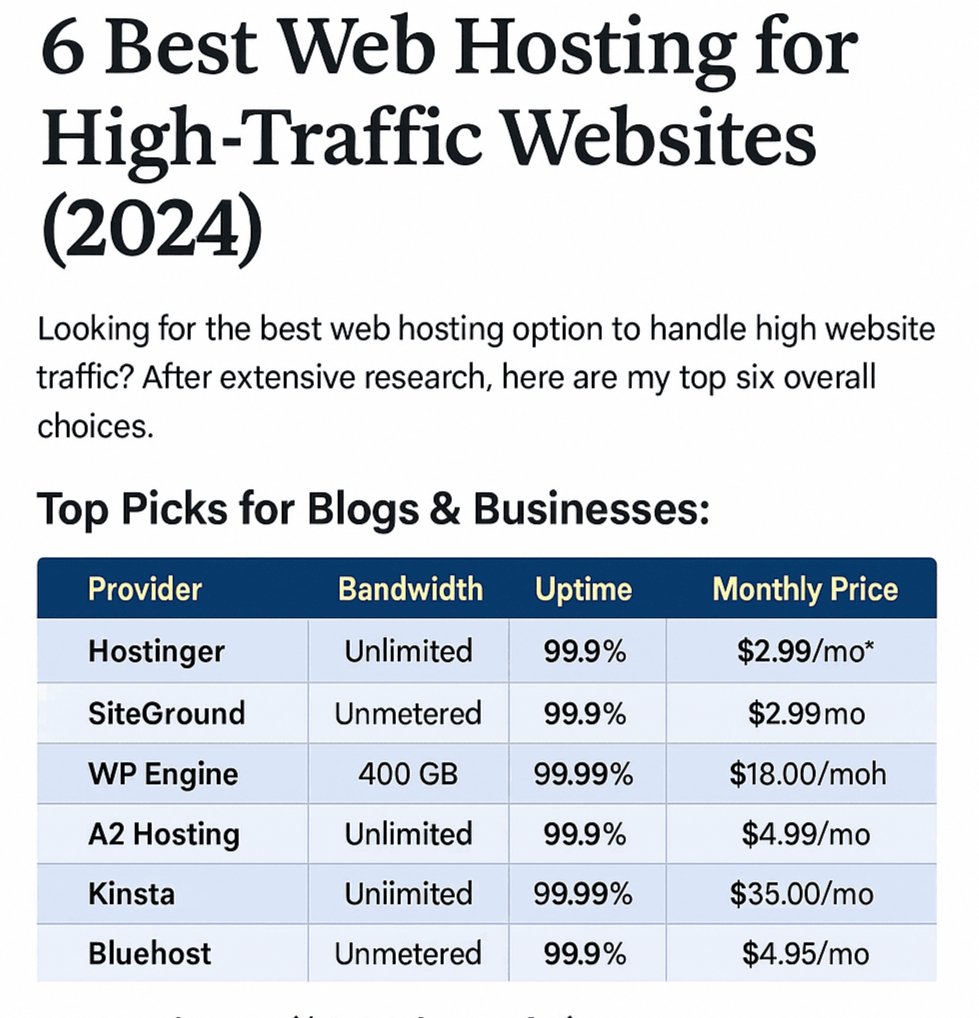
Why Website Speed Matters in 2025? ✅ Full Optimization Checklist (2025 Ready) 1. Use Lightweight Theme Choose fast themes like: 2. Switch to Fast Hosting Use: 3. Enable Caching Install any of these: 4. Use CDN (Content Delivery Network) Recommended: 5. Minify HTML, CSS, JS WP Rocket, Autoptimize, or LiteSpeed Cache help with this. 6. Disable Unused Plugins Fewer plugins = better performance. Use “Query Monitor” plugin to find slow plugins. 7. Image Optimization Use: 8. Lazy Load Images & Iframes Built-in in WP 6.1+, or use caching plugin. 9. Remove Unused CSS/JS Use Flying Scripts or Perfmatters plugin. 10. Database Optimization 🛠 Pro Tips for Developers 📈 Real-World Speed Example Metric Before After Optimization Load Time 6.2s 1.8s Page Size 3.5 MB 0.9 MB Requests 120 43 Lighthouse Score 38 95 🔍 Tools You Should Bookmark 🔚 Final Words Website speed is no longer optional — it directly impacts SEO, user trust, and AdSense revenue. Agar aap WordPress developer hain ya blogger, toh abhi se hi apne site ko optimize kijiye.
